

Axios npm Supply Chain Attack Delivers Cross-Platform Malware
April 3, 2026
How Hackers Wiped 200,000 Devices Without a Single Line of Malware: Inside the Stryker Intune Attack
April 23, 2026Vercel Security Incident: What Developers Need to Know Right Now

The Short Version
Vercel — the cloud platform behind Next.js, used by millions of developers worldwide — confirmed a security breach on 19 April 2026. The attacker did not go through Vercel directly. They came in through a small, third-party AI tool that a Vercel employee had granted unrestricted access to their corporate Google account.
If you have projects hosted on Vercel, you need to rotate your environment variables now — regardless of whether Vercel has contacted you.
What Happened: The Full Attack Chain
This breach is a textbook supply chain attack. It started nowhere near Vercel.
Stage 1 — A Roblox Script Starts a Corporate Breach
In February 2026, an employee at Context.ai — a small enterprise AI productivity tool — downloaded what they thought were Roblox game exploit scripts. Instead, they installed Lumma Stealer, a credential-harvesting malware that is increasingly common in drive-by infections targeting developers.
The malware silently extracted the employee’s credentials, including their Google Workspace login, along with access keys for Supabase, Datadog, and Authkit. Critically, the compromised account included support@context.ai — a high-privilege account with broad internal access.
Stage 2 — Context.ai Gets Compromised
Using those harvested credentials, the attacker gained access to Context.ai’s AWS environment and, separately, compromised OAuth tokens belonging to its consumer users. Context.ai identified and blocked the AWS intrusion at the time, but it would later emerge that the OAuth token compromise had a much wider blast radius than initially understood.
Stage 3 — The Pivot Into Vercel
Here is where it gets critical for developers to understand.
Context.ai had built a Chrome browser extension (ID: omddlmnhcofjbnbflmjginpjjblphbgk) that allowed users to search and pull data from their Google Drive. At least one Vercel employee had installed this extension and connected it using their Vercel enterprise Google Workspace account — granting it “Allow All” OAuth permissions in the process.
With the Context.ai OAuth tokens now compromised, the attacker used them to take over the Vercel employee’s Google Workspace account. From there, they moved laterally into Vercel’s internal systems.
Stage 4 — Environment Variables Accessed
Once inside, the attacker enumerated Vercel’s internal environments and accessed environment variables that had not been marked as “sensitive.” In Vercel’s architecture, sensitive variables are encrypted at rest and cannot be read back through the platform. Non-sensitive variables — including API keys, database credentials, signing keys, and tokens — are stored in plaintext and were accessible.
Vercel CEO Guillermo Rauch described the attacker as “highly sophisticated” and noted they moved with “surprising velocity and in-depth understanding of Vercel’s systems.” He also stated he “strongly suspects” the attack was significantly accelerated by AI.
Stage 5 — Data Listed for Sale
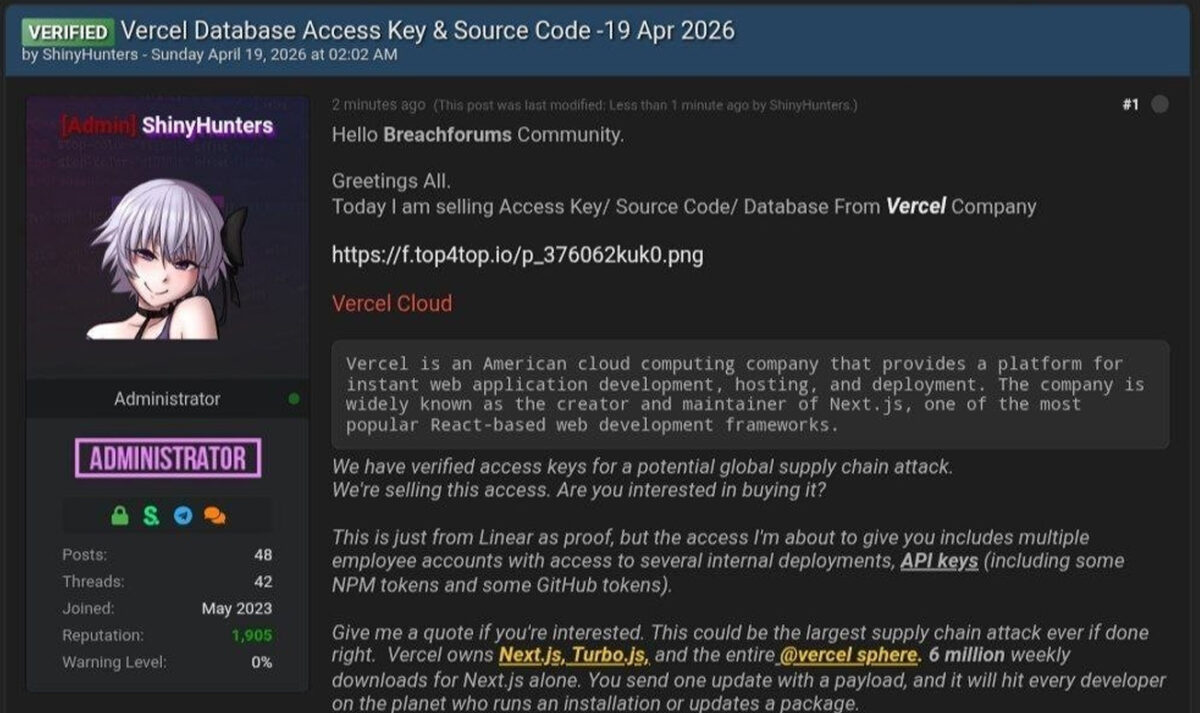
A threat actor claiming affiliation with ShinyHunters listed stolen Vercel data on BreachForums, asking $2 million. The post claimed to include employee accounts, internal deployment access, API keys, npm tokens, and GitHub tokens.
As proof, the actor shared a file containing 580 Vercel employee records — names, email addresses, account statuses, and timestamps — along with a screenshot of what appeared to be an internal Vercel Enterprise dashboard.
ShinyHunters members have since denied any involvement. The forum post has been removed.
What Is and Is Not Confirmed
It is worth being precise here. Not everything the attacker claimed has been independently verified.
Confirmed by Vercel:
- Unauthorised access to internal systems occurred
- A limited subset of customers had non-sensitive environment variables exposed
- The breach originated via Context.ai’s compromised OAuth app
- Vercel is working with Mandiant, law enforcement, GitHub, Microsoft, npm, and Socket
Confirmed as safe:
- Environment variables marked as “sensitive” — not accessed
- npm packages published by Vercel — not tampered with
- Next.js, Turbopack, and Vercel’s open-source projects — unaffected
Still under investigation:
- Full scope of what was exfiltrated
- Whether the ShinyHunters claim is genuine
- Whether any ransom was demanded or paid
Why This Matters Beyond Vercel
This incident is not just a Vercel story. It is a warning for every team using AI productivity tools.
Context.ai’s Chrome extension required broad Google OAuth permissions to function. That is fairly standard for AI tools that need to read documents and calendars. But when that extension was compromised, it handed the attacker a fully authenticated session into an employee’s corporate Google Workspace — with no additional verification required.
Vercel’s own investigation confirmed the Context.ai OAuth app “potentially affected its hundreds of users across many organisations.” Other companies beyond Vercel may already be affected and simply do not know yet.
This represents an emerging class of supply chain risk that most security teams have not fully addressed: AI tools as lateral movement vectors. The attack did not breach Vercel’s perimeter. It walked through the side door via a trusted, low-scrutiny third-party tool.
Immediate Actions for Vercel Users
These are not optional recommendations. If you use Vercel in production, treat these as required.
1. Check the Google Workspace IOC
Whether or not you use Vercel directly, audit your Google Workspace admin console for this OAuth application:
110671459871-30f1spbu0hptbs60cb4vsmv79i7bbvqj.apps.googleusercontent.comIf it appears in your OAuth grants, revoke access immediately and audit all activity associated with it.
2. Rotate All Non-Sensitive Environment Variables
Log into Vercel and go to vercel.com/all-env-vars. Rotate any variable not marked as “sensitive.” This includes:
- API keys (OpenAI, Stripe, Twilio, SendGrid, etc.)
- Database connection strings and passwords
- JWT signing keys and session secrets
- Webhook tokens
- Any third-party service credentials
Important: Deleting your Vercel project does not remove the risk. Rotate the actual secrets first — otherwise the credentials remain valid even after the project is gone.
3. Mark All Existing Secrets as Sensitive
Vercel has already updated its platform to default new environment variables to “sensitive.” Go back through your existing projects and toggle sensitive on for anything that should not be readable in plaintext. This is the most impactful change you can make right now.
4. Audit Your Activity Logs
Check your Vercel dashboard activity log or use the CLI:
vercel activityLook for unexpected env.read or env.list operations, unfamiliar IP addresses, or deployments you did not trigger.
5. Review Recent Deployments
Check your deployments page for anything you did not initiate. If you find unexpected deployments, delete them and investigate their trigger source.
6. Enable MFA on Your Vercel Account
If not already done, configure an authenticator app or passkey in your account authentication settings. SMS-based MFA is insufficient against session token attacks — use TOTP or a hardware key.
7. Audit All Third-Party OAuth Grants
Open your Google Workspace admin console and review every OAuth-connected application. Revoke anything unused, unrecognised, or no longer actively needed. This should be a quarterly hygiene exercise regardless of incidents.
Longer-Term: Rethink How You Store Secrets
This incident exposes a structural problem that extends well beyond Vercel: storing long-lived credentials as platform environment variables creates a single point of failure.
A better architecture injects secrets at runtime from a dedicated secrets manager rather than storing them statically in a platform:
| Tool | Best For |
|---|---|
| HashiCorp Vault | Self-hosted, enterprise-grade environments |
| AWS Secrets Manager | AWS-native workloads |
| Doppler | Developer-friendly managed option |
| Infisical | Open-source self-hostable alternative |
Additionally, where your CI/CD pipeline supports it, switch to OIDC-based authentication. Rather than issuing long-lived tokens per service, OIDC issues short-lived tokens scoped to individual deployment runs. If your pipeline is compromised, there are no persistent credentials for an attacker to harvest.
What Vercel Has Shipped Since the Breach
Vercel has made several platform changes in response:
- Environment variable creation now defaults to sensitive: on
- Improved team-wide management and visibility of environment variables
- Activity logs updated with better filtering and deep-link navigation
- Clearer team invite email verification flow
These defaults should have been in place earlier, but the changes are a meaningful improvement and worth validating against your own projects.
The Bigger Pattern
Three major supply chain incidents have hit developer infrastructure within weeks of each other: the Axios npm compromise linked to North Korea, the Context.ai / Vercel OAuth attack, and growing scrutiny around AI tools holding broad workspace permissions.
The pattern is consistent. Attackers are not hammering hardened infrastructure. They are walking through trusted, low-scrutiny access points — an AI Chrome extension, a compromised npm maintainer token, an OAuth grant with “Allow All” scope.
The attack surface is expanding precisely because development workflows are more AI-integrated and interconnected than ever before. Every third-party tool connected to your Google Workspace, GitHub account, or CI/CD pipeline is now a potential entry point and should be treated accordingly.
Summary
| What happened | Lumma Stealer infected a Context.ai employee → attacker stole OAuth tokens → pivoted into Vercel employee’s Google Workspace → accessed non-sensitive environment variables across internal systems |
| Who is affected | A limited subset of Vercel customers; broader Google Workspace OAuth impact still under investigation |
| What’s confirmed safe | Sensitive env vars, npm packages, Next.js, Turbopack |
| IOC to check immediately | 110671459871-30f1spbu0hptbs60cb4vsmv79i7bbvqj.apps.googleusercontent.com |
| Action required | Rotate non-sensitive env vars. Mark all secrets as sensitive. Audit OAuth grants. Enable MFA. Review deployments and activity logs. |
Need technical cybersecurity content that is accurate, developer-friendly, and built to rank? Get in touch — I write clear breakdowns of complex incidents like this one for blogs, security teams, and publications.